
• About
  • Advertise
  • Privacy & Policy
  • Contact
Zaku Malawi
  • News
    • Politics
    • Economy
    • Crime and Courts
    • Education
    • Human Rights
  • People
    • Who runs Malawi
    • Members of Parliament
    • Cabinet
    • Presidents
  • Malawi Life
    • Communities
    • Arts & Culture
    • Entertainment
    • Food and Recipes
    • Health
    • Farming
    • Travel
  • Sports
    • Football
    • Netball
    • Basketball
    • Cricket
    • Golf
  • Science & Tech
  • Guides
    • Utilities & Energy
    • Internet & Phones
    • Finances & Taxes
    • Water & Sanitation
    • TV, Radio & Streaming
    • Civic & Government
  • Zaku Originals
    • Zaku Learn
    • Zaku Research
    • The Challenge
    • Zaku Tools
    • Zaku Games
    • Zaku Voices
  • News
    • Politics
    • Economy
    • Crime and Courts
    • Education
    • Human Rights
  • People
    • Who runs Malawi
    • Members of Parliament
    • Cabinet
    • Presidents
  • Malawi Life
    • Communities
    • Arts & Culture
    • Entertainment
    • Food and Recipes
    • Health
    • Farming
    • Travel
  • Sports
    • Football
    • Netball
    • Basketball
    • Cricket
    • Golf
  • Science & Tech
  • Guides
    • Utilities & Energy
    • Internet & Phones
    • Finances & Taxes
    • Water & Sanitation
    • TV, Radio & Streaming
    • Civic & Government
  • Zaku Originals
    • Zaku Learn
    • Zaku Research
    • The Challenge
    • Zaku Tools
    • Zaku Games
    • Zaku Voices
Zaku Malawi
No Result
View All Result

Home › Guides › Internet & Phones › How to Install TNM Smart App on Android and iPhone

How to Install TNM Smart App on Android and iPhone

Mercy MhangobyMercy Mhango
November 21, 2026
Reading Time: 12 mins read
21views
tnm smart app cover logo
Share on FacebookShare on Twitter
TNM · official app

How to install TNM Smart App on Android and iPhone

The free TNM app for balances, bundles, airtime, Mpamba, bills and more, without remembering a single code.

Get it onGoogle PlayDownload on theApp Store
  • Free
  • Android and iPhone
  • 1M+ downloads on Google Play

Quick answer: Download TNM Smart App free from Google Play or the App Store, open it and follow the steps to register your TNM number. You can then check balances, buy bundles, recharge, share data and use Mpamba without dialling codes.

Download

Get the TNM Smart App

Get it onGoogle PlayDownload on theApp Store
6.6.0latest version (App Store, 12 Nov 2026)
1M+downloads on Google Play
iOS 16or newer needed on iPhone
142 MBdownload size on iPhone
What it does

Everything you can do in the TNM Smart App

TNM keeps adding to it. These are the features in the November 2026 version.

Balances and usageAirtime, every bundle and your Mpamba wallet on one screen, plus a monthly breakdown of data, SMS and airtime, including how much went on social media.
Buy any bundleData, Mixit, voice and SMS bundles, including building your own Mixit SuperFlex, paid with airtime or Mpamba.
App-only offersPromotions and discounted bundles that only show in the app, plus Yanga bundles whose price changes through the day.
Recharge and shareLoad a voucher, top up another number, send airtime with Me2U, and share your data with up to 10 numbers.
Borrow with PasavuteBorrow airtime or a bundle when you run out. TNM says you need to have used your line for at least 30 days.
Mpamba in the appSend money, pay merchants, move money to other mobile money services, and withdraw at Mpamba agents.
Banks and billsSend money to a bank account and pay utilities, TV subscriptions and other services.
Cash advance (new)Added in the November 2026 update, along with reversing a Mpamba send-money mistake yourself and paying with your fingerprint or face.
Tilitonse funeral coverSign up for NICO Life’s Tilitonse cover from the app and pay premiums with Mpamba.
Your MiFi and routerLink other TNM numbers, such as a MiFi or home router, then check and top them up from one app.
Find your way

A quick tour of the app

The app has four tabs along the bottom: Home, Recharges, Services and Settings. The look changes a little with each update.

  1. Home: balances and your Mpamba wallet

    The first screen shows your airtime, active bundles and Mpamba wallet, with quick buttons to pay, cash out and send money.
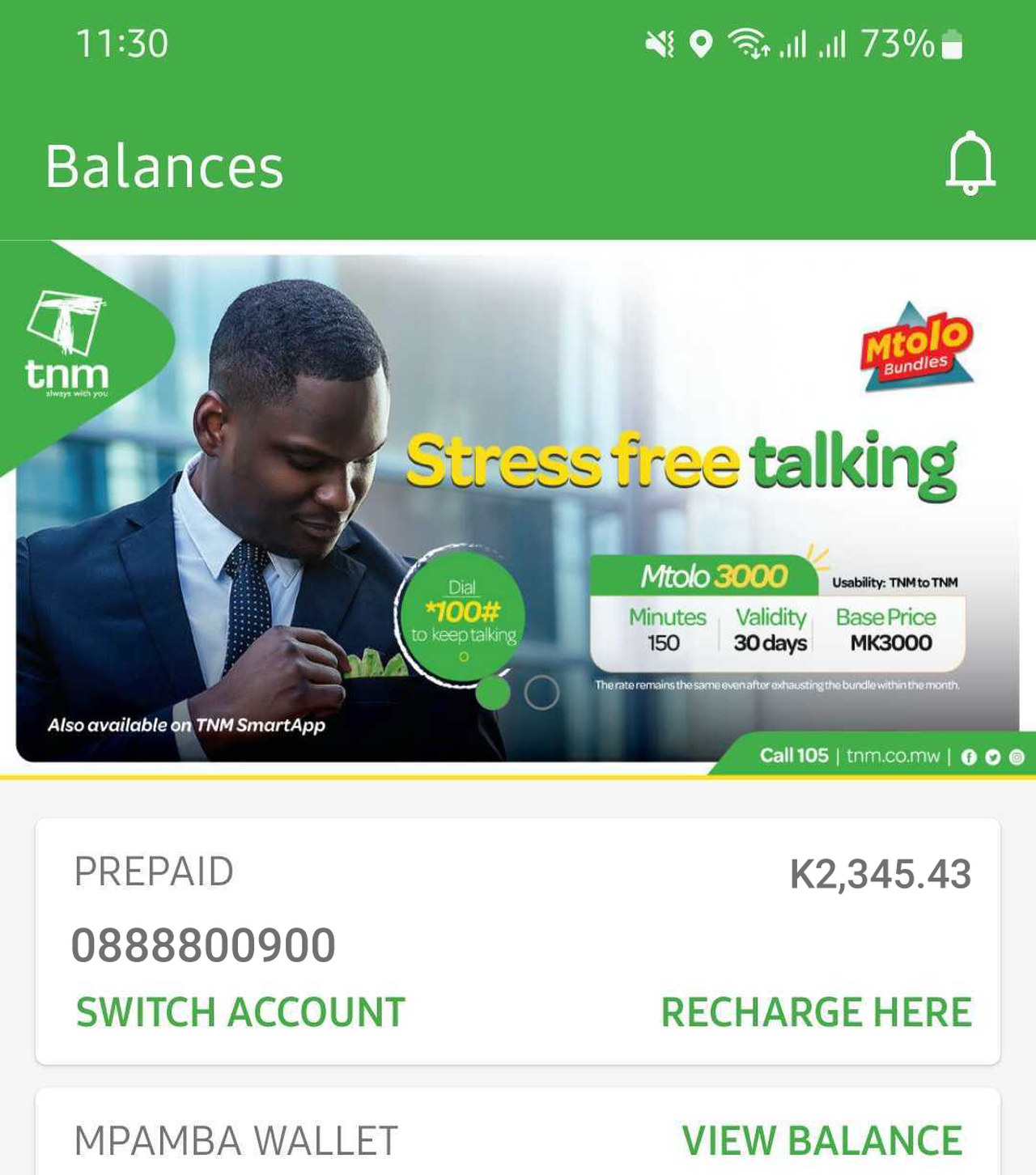
    TNM Smart App home screen with balances and Mpamba wallet
    Home screen
  2. Recharges: airtime, Me2U, Pasavute and bundles

    Load a scratch card, buy airtime from Mpamba, send credit with Me2U, borrow with Pasavute, and open the internet, voice and SMS bundle lists.
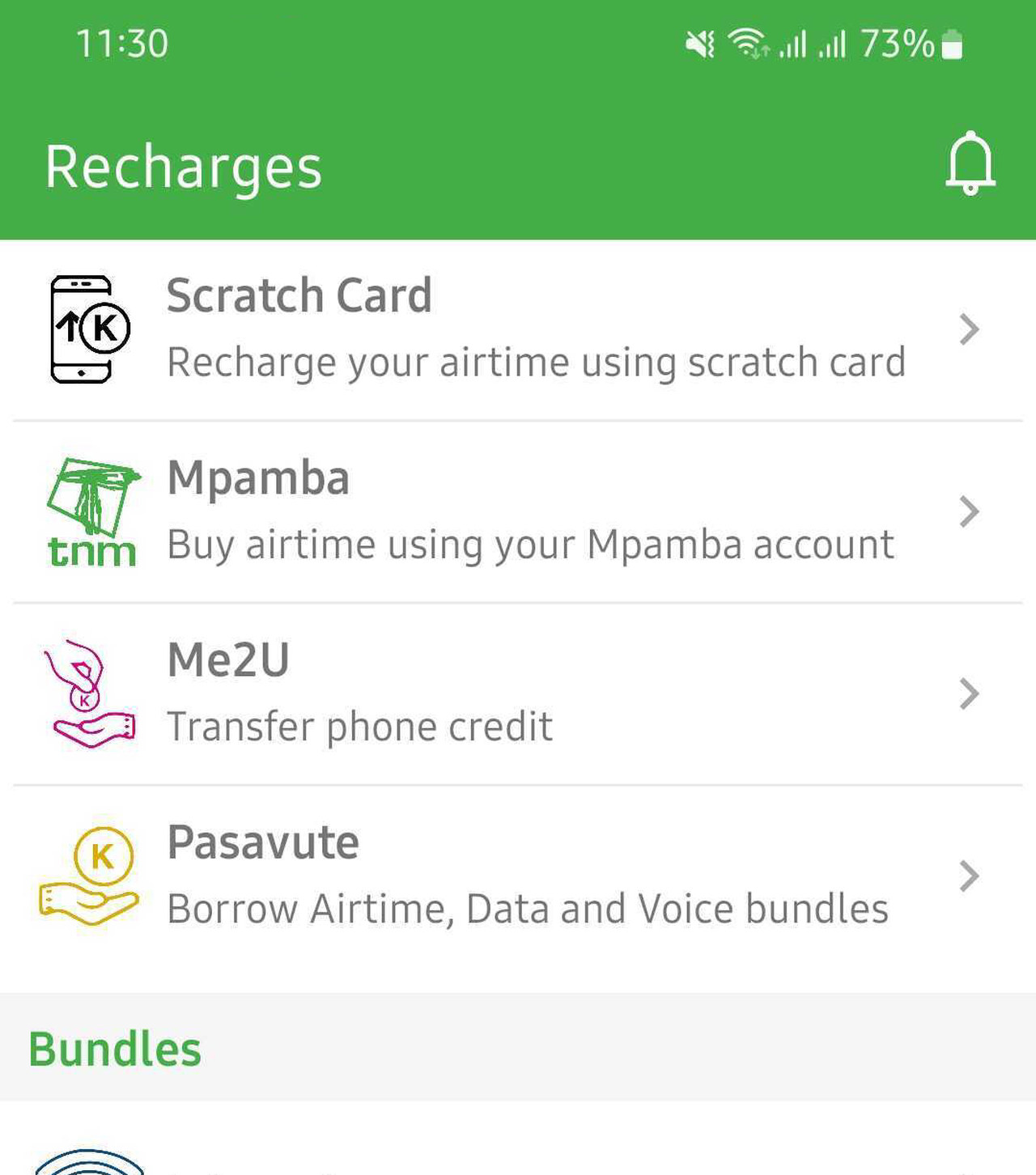
    TNM Smart App Recharges menu
    Recharges menu
  3. Services: sharing, Mpamba and more

    Share bundles, keep your number, see Mpamba statements and receipts, manage the Mpamba debit card and check Mpamba fees.
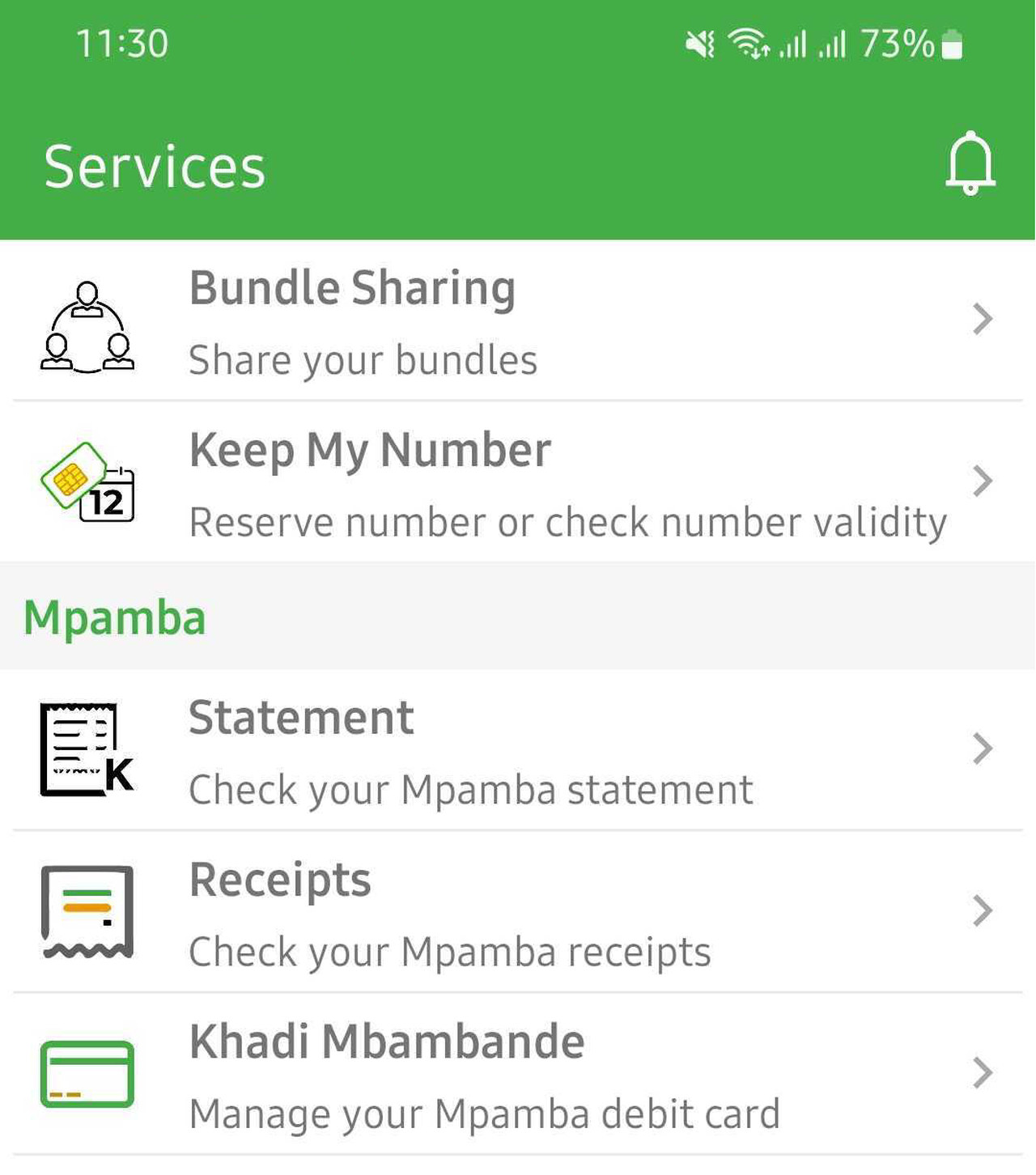
    TNM Smart App Services menu
    Services menu
Sign up

How to register and log in

  1. Install the app

    Get TNM Smart App from Google Play or the App Store. It is free. On iPhone you need iOS 16 or newer.

  2. Register your TNM number

    Open the app and follow the steps on screen to register the TNM number you want to manage. Keep that SIM in the device, because TNM confirms it by text message.

  3. Add your other numbers

    Under Services, link a second SIM, a MiFi or a home router as an associated account, so you can check and top them up too.

Never share a confirmation code or your Mpamba PIN with anyone, even a caller who says they work for TNM.

Funeral cover

Register for Tilitonse in the app

  1. Open Services

    In the app, tap Services, then Other Service, then Tilitonse Funeral Cover.

  2. Confirm it is you

    Enter the OTP, agree to share your details with TNM and NICO, and check the details on record.

  3. Choose your cover

    The app opens NICO Life’s page. Pick a cover level (TNM’s guide lists Platinum MK5,000,000, Gold MK800,000, Silver MK550,000 and Bronze MK150,000), a yearly increase and how often to pay.

  4. Pay the first premium

    Confirm the premium, note your policy number, and pay the first premium from Mpamba.

Troubleshooting

When the app does not work

The confirmation text does not arrive

Check the number you typed and that the TNM SIM is in the device with signal. Wait a minute and tap resend. If your inbox is full, delete a few messages. Still nothing: call 105.

The app will not open or keeps crashing

Update it from Google Play or the App Store first: TNM updates it often. On Android, clear the app’s cache in Settings > Apps > TNM Smart App > Storage, then restart the device.

It says my iPhone is not supported

The current version needs iOS 16 or newer. Update iOS in Settings > General > Software Update if your iPhone allows it.

A bundle or payment failed

Check your airtime or Mpamba balance on the home screen before trying again, so you do not pay twice. For a Mpamba send-money mistake, the November 2026 update lets you reverse it yourself; otherwise call 105.

No data to open the app

Use the codes instead: *202# to buy a bundle, #123# for balances, *444# for Mpamba.

The full list of TNM codes is in our TNM USSD codes guide.

Help

Contact TNM

Call 105TNM call centreWhatsApp 0888 800 900Chat with TNM
Questions

TNM Smart App FAQ

Is the TNM Smart App free?

Yes. It is free to download on Google Play and the App Store.

How do I register on the TNM Smart App?

Install it, open it and follow the on-screen steps to register your TNM number, with that SIM in the device.

Can I use Mpamba in the TNM Smart App?

Yes. You can check your Mpamba balance, send money, pay merchants and bills, send money to banks, withdraw at agents and pay for bundles.

Can I manage my MiFi or router in the app?

Yes. Add it as an associated account under Services, then check its balance and top it up.

Why is a bundle cheaper in the app?

TNM runs app-only promotions, so the price in the app can be lower than on *202#.

Does the TNM Smart App work on iPhone?

Yes, on iPhones with iOS 16 or newer.

What is new in the TNM Smart App?

The November 2026 update added cash advance, reversing a Mpamba send-money mistake yourself, Mixit SuperFlex bundles paid with Mpamba, and better fingerprint and face payments.

Related guides

Keep reading

Mobile data in MalawiBundles, codes and saving data
Malawi GuidePlan your Lake Malawi tripVisas, money, beaches and getting around.Open the guide →Ad
Mercy Mhango

Mercy Mhango

Mercy leads our guides and science explainers, from ESCOM tokens to gene editing. She turns confusing topics into plain steps and shows why they matter in Malawi.

Next Post
airtel malawi ussd codes cover

Airtel Malawi USSD Codes: Bundles, Airtel Money and Customer Care

Please login to join discussion

People Malawians worth knowing Leaders, artists, athletes and builders. Meet them → Ad

Get new stories by email

Guides, news and explainers from Zaku Malawi. Free, and you can leave any time.

Latest

  • escom mobile cover Utilities & Energy ESCOM Mobile App: Report Faults, Find Tokens, Load Shedding 2 hours ago
  • bwb madzi app cover Water & Sanitation BWB Madzi App: Check Water Bills and Tokens, Report Faults 3 hours ago
  • airtel chezani voice bundles cover Internet & Phones Airtel Chezani Voice Bundles: Minutes, Prices and ChezaMax 3 hours ago
  • airtel mofaya data bundles cover Internet & Phones Airtel MoFaya Bundles: Daily, Weekly and Monthly Data Prices 3 hours ago
  • mtl shops contacts cover Internet & Phones MTL Shops and Contacts: All 12 Service Centres, Phone and Email 3 hours ago

Advertise Reach Malawi on Zaku Put your brand in front of readers at home and abroad. Get rates → Ad

Zaku Malawi

Copyright © 2026 Zaku Malawi

Navigate Site

  • About
  • Advertise
  • Privacy & Policy
  • Contact

Follow Us

Welcome Back!

Sign In with Facebook
Sign In with Google
OR

Login to your account below

Forgotten Password? Sign Up

Create New Account!

Sign Up with Facebook
Sign Up with Google
OR

Fill the forms below to register

All fields are required. Log In

Retrieve your password

Please enter your username or email address to reset your password.

Log In
0 people online
Zaku Malawi

Help

  • Contact Us
  • Submit News
  • Privacy Policy
  • Sitemap

Zaku Malawi

  • About Us
  • Our Team
  • Advertise
  • Work With Us
  • Newsletter

Follow us

No Result
View All Result
  • News
    • Politics
    • Economy
    • Crime and Courts
    • Education
    • Human Rights
  • People
    • Who runs Malawi
    • Members of Parliament
    • Cabinet
    • Presidents
  • Malawi Life
    • Communities
    • Arts & Culture
    • Entertainment
    • Food and Recipes
    • Health
    • Farming
    • Travel
  • Sports
    • Football
    • Netball
    • Basketball
    • Cricket
    • Golf
  • Science & Tech
  • Guides
    • Utilities & Energy
    • Internet & Phones
    • Finances & Taxes
    • Water & Sanitation
    • TV, Radio & Streaming
    • Civic & Government
  • Zaku Originals
    • Zaku Learn
    • Zaku Research
    • The Challenge
    • Zaku Tools
    • Zaku Games
    • Zaku Voices

Copyright © 2026 Zaku Malawi

English