
• About
  • Advertise
  • Privacy & Policy
  • Contact
Zaku Malawi
  • News
    • Politics
    • Economy
    • Crime and Courts
    • Education
    • Human Rights
  • People
    • Who runs Malawi
    • Members of Parliament
    • Cabinet
    • Presidents
  • Malawi Life
    • Communities
    • Arts & Culture
    • Entertainment
    • Food and Recipes
    • Health
    • Farming
    • Travel
  • Sports
    • Football
    • Netball
    • Basketball
    • Cricket
    • Golf
  • Science & Tech
  • Guides
    • Utilities & Energy
    • Internet & Phones
    • Finances & Taxes
    • Water & Sanitation
    • TV, Radio & Streaming
    • Civic & Government
  • Zaku Originals
    • Zaku Learn
    • Zaku Research
    • The Challenge
    • Zaku Tools
    • Zaku Games
    • Zaku Voices
  • News
    • Politics
    • Economy
    • Crime and Courts
    • Education
    • Human Rights
  • People
    • Who runs Malawi
    • Members of Parliament
    • Cabinet
    • Presidents
  • Malawi Life
    • Communities
    • Arts & Culture
    • Entertainment
    • Food and Recipes
    • Health
    • Farming
    • Travel
  • Sports
    • Football
    • Netball
    • Basketball
    • Cricket
    • Golf
  • Science & Tech
  • Guides
    • Utilities & Energy
    • Internet & Phones
    • Finances & Taxes
    • Water & Sanitation
    • TV, Radio & Streaming
    • Civic & Government
  • Zaku Originals
    • Zaku Learn
    • Zaku Research
    • The Challenge
    • Zaku Tools
    • Zaku Games
    • Zaku Voices
Zaku Malawi
No Result
View All Result

Home › Guides › Internet & Phones › TNM Mpamba Debit Card: How to Apply and Use It

TNM Mpamba Debit Card: How to Apply and Use It

Mercy MhangobyMercy Mhango
November 21, 2026
Reading Time: 10 mins read
21views
TNM Mpamba debit card guide cover with the TNM logo
Share on FacebookShare on Twitter
TNM · Mpamba

TNM Mpamba debit card: how to get Khadi Mbambande

A Mastercard debit card that spends straight from your Mpamba wallet. No bank account needed.

How to applyFees
  • Apply: *444# › 5 › 5
  • Network: Mastercard
  • Collect: TNM shop

Quick answer: To get the TNM Mpamba debit card (Khadi Mbambande), dial *444#, choose 5 Banks & Financial Services, then 5 Mpamba Debit Card, and confirm with your Mpamba PIN. You get a virtual card for online payments. For a plastic card for ATMs and shops, collect it at a TNM shop. It spends your Mpamba balance, anywhere Mastercard is accepted.

The card

What the Mpamba debit card is

Khadi Mbambande is a Mastercard debit card linked to your TNM Mpamba wallet instead of a bank account. TNM launched it with Mastercard in 2021, first as a virtual card for online shopping, then as a plastic card issued with National Bank of Malawi.

MpambaKhadi Mbambande

•••• •••• ••••

Illustration, not the real card design

NameKhadi Mbambande
NetworkMastercard
Money comes fromYour Mpamba wallet
Bank partnerNational Bank of Malawi
Two versions

Virtual card and physical card

Virtual card
  • A card number, expiry date and security code on your device
  • For online payments
  • Card details come to you after you apply
Physical card
  • A plastic Mastercard debit card
  • For ATMs and card machines, and online too
  • Collect it at a TNM shop
Apply

How to apply on *444#

Works on any device with a TNM line registered for Mpamba. No data needed.

  1. 1Dial*444#Opens the Mpamba main menu
  2. 2Choose5Banks & Financial Services
  3. 3Choose5Mpamba Debit Card
  4. 4FollowPromptsRead the fee on screen, then confirm with your Mpamba PIN

The option sits inside Banks & Financial Services, next to Banks, FESA, Savings and Loans, Mudziwathu Village Bank and Insurance (TNM’s own June 2026 menu guide). For every other TNM and Mpamba code, see TNM USSD codes.

With data

Apply in the TNM Smart App

Open the app, tap Services, then the Mpamba debit card option. The same menu shows Mpamba statements, receipts and fees.

New to the app? How to install the TNM Smart App.
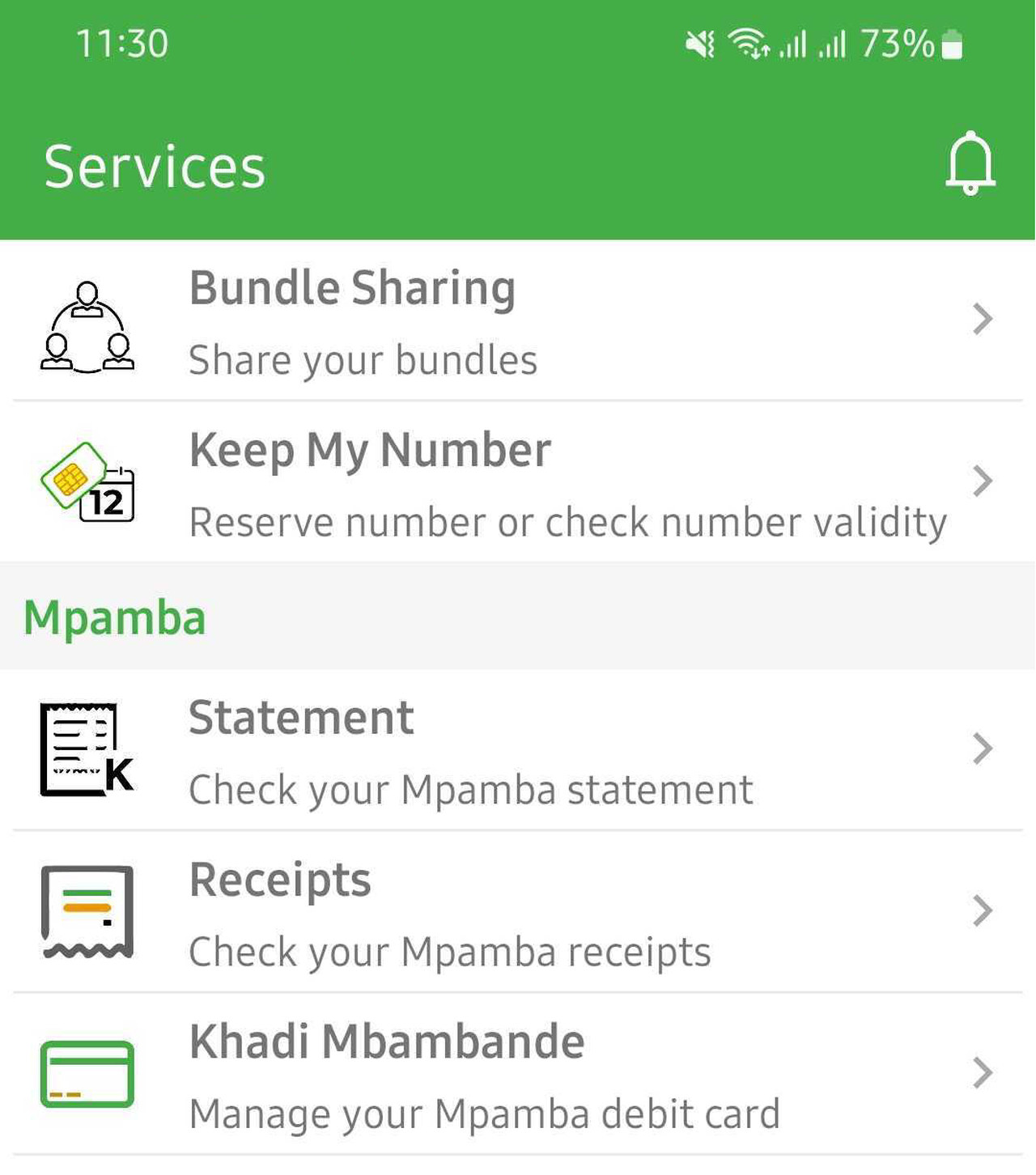
TNM Smart App Services menu with the Mpamba debit card option
Services menu
Plastic card

Collecting the physical card

After you apply, go to a TNM shop to collect the plastic card. Take your national ID in case the shop asks for it, and the TNM line your Mpamba account is on. When you choose a card PIN, make it different from your Mpamba PIN.

Using it

What you can do with it

Pay onlineShops and services that take Mastercard, using the card number, expiry date and security code
Pay in shopsCard machines in Malawi and abroad that take Mastercard (physical card)
Withdraw cashATMs that show the Mastercard logo (physical card). ATM fees apply
Spend your Mpamba moneyThe card draws on your Mpamba balance. Top up Mpamba and the card has more to spend

It is a debit card, not credit: you can only spend what is in your Mpamba wallet, plus any fees.

Costs

Fees: check before you confirm

Mpamba’s fee documents for the card (application, ATM withdrawals and card payments) are not loading online, and older figures quoted on other sites do not match each other. The *444# menu shows the application fee before you enter your PIN: read it there, or ask at a TNM shop. For sending and cash-out charges, see mobile money fees in Malawi.

Stay safe

Keep the card safe

  • Never share the card number, security code, card PIN or Mpamba PIN, even with someone who says they are from TNM.
  • Only pay online on sites you trust, and check the amount before you confirm.
  • Lost the card or see a payment you did not make? Call 105 at once so TNM can block it.
Contact TNM

Help with the card

Call 105TNM call centreWhatsApp 0888 800 900Chat with TNM
Questions

Mpamba debit card FAQ

How do I apply for the TNM Mpamba debit card?

Dial *444#, choose 5 Banks & Financial Services, then 5 Mpamba Debit Card, and follow the prompts. Or use Services in the TNM Smart App.

What is Khadi Mbambande?

The name of TNM’s Mpamba debit card: a Mastercard linked to your Mpamba wallet.

How much does the Mpamba debit card cost?

TNM does not publish a current fee online. The *444# menu shows the fee before you confirm, or ask at a TNM shop.

Where do I collect the physical card?

At a TNM shop, after applying on *444# or in the Smart App.

Can I withdraw cash at an ATM?

Yes, with the physical card, at ATMs that take Mastercard. ATM fees apply.

Can I use it to pay online?

Yes. Use the card number, expiry date and security code on any site that takes Mastercard.

Do I need a bank account?

No. The card spends your Mpamba balance.

What do I do if I lose the card?

Call TNM on 105 straight away to block it.

Malawi GuidePlan your Lake Malawi tripVisas, money, beaches and getting around.Open the guide →Ad
Mercy Mhango

Mercy Mhango

Mercy leads our guides and science explainers, from ESCOM tokens to gene editing. She turns confusing topics into plain steps and shows why they matter in Malawi.

Next Post
Airtel logo with the words Airtel TV app is gone

Airtel TV App No Longer Available: Where to Watch Instead

Please login to join discussion

People Malawians worth knowing Leaders, artists, athletes and builders. Meet them → Ad

Get new stories by email

Guides, news and explainers from Zaku Malawi. Free, and you can leave any time.

Latest

  • escom mobile cover Utilities & Energy ESCOM Mobile App: Report Faults, Find Tokens, Load Shedding 3 hours ago
  • bwb madzi app cover Water & Sanitation BWB Madzi App: Check Water Bills and Tokens, Report Faults 3 hours ago
  • airtel chezani voice bundles cover Internet & Phones Airtel Chezani Voice Bundles: Minutes, Prices and ChezaMax 3 hours ago
  • airtel mofaya data bundles cover Internet & Phones Airtel MoFaya Bundles: Daily, Weekly and Monthly Data Prices 3 hours ago
  • mtl shops contacts cover Internet & Phones MTL Shops and Contacts: All 12 Service Centres, Phone and Email 3 hours ago

Advertise Reach Malawi on Zaku Put your brand in front of readers at home and abroad. Get rates → Ad

Zaku Malawi

Copyright © 2026 Zaku Malawi

Navigate Site

  • About
  • Advertise
  • Privacy & Policy
  • Contact

Follow Us

Welcome Back!

Sign In with Facebook
Sign In with Google
OR

Login to your account below

Forgotten Password? Sign Up

Create New Account!

Sign Up with Facebook
Sign Up with Google
OR

Fill the forms below to register

All fields are required. Log In

Retrieve your password

Please enter your username or email address to reset your password.

Log In
0 people online
Zaku Malawi

Help

  • Contact Us
  • Submit News
  • Privacy Policy
  • Sitemap

Zaku Malawi

  • About Us
  • Our Team
  • Advertise
  • Work With Us
  • Newsletter

Follow us

No Result
View All Result
  • News
    • Politics
    • Economy
    • Crime and Courts
    • Education
    • Human Rights
  • People
    • Who runs Malawi
    • Members of Parliament
    • Cabinet
    • Presidents
  • Malawi Life
    • Communities
    • Arts & Culture
    • Entertainment
    • Food and Recipes
    • Health
    • Farming
    • Travel
  • Sports
    • Football
    • Netball
    • Basketball
    • Cricket
    • Golf
  • Science & Tech
  • Guides
    • Utilities & Energy
    • Internet & Phones
    • Finances & Taxes
    • Water & Sanitation
    • TV, Radio & Streaming
    • Civic & Government
  • Zaku Originals
    • Zaku Learn
    • Zaku Research
    • The Challenge
    • Zaku Tools
    • Zaku Games
    • Zaku Voices

Copyright © 2026 Zaku Malawi

English